
Zephyr Driver For a Differential Pressure Sensor SDP810-500PA
Over the past few weeks I’ve been messing around with the Nordic nRF52 Dev kit and slowly working my way through Nordic’s Developer Academy courses. This has been my first time developing for RTOS and honestly, I’ve been enjoying it quite a lot.
I’m currently building a prototype of a small airflow meter that’s going to help with adjusting ventilation valves (has to do with my air duct cleaning business).
I’m still waiting for the differential pressure sensor to arrive but I figured that I can already start writing the device drivers for the peripherals.
This post documents implementing an out-of-tree Zephyr driver with runtime power management for Sensirion SDP8XX Differential Pressure Sensors.
Here is link to the full source: https://github.com/poh0/sdp8xx_sensor_driver.
The code snippets in this blog post will be simplifications and some boilerplate details will be left off.
I strongly suggest to have the repo open while reading this.
The Sensor
Here are the key reasons I chose Differential Pressure Sensor SDP810-500PA for my project:
- 2-wire I2C interface. Digital is always nicer to deal with.
- Supports mass flow compensatsed differential pressure. This is a must for measuring air flow.
- Very good price (20€ ish) compared to analog equivalents.
- Has drivers for other MCU platforms, which I can use as reference to speed up development.
- Measurement accuracy and range just enough for my purposes (real life HVAC systems measurements)
- Wide voltage range 2.7V - 5.5V. No need for step-up or LDO if we are powering with batteries.
- Current consumption also reasonably low (few mA when actively measuring, under 1 uA sleep).
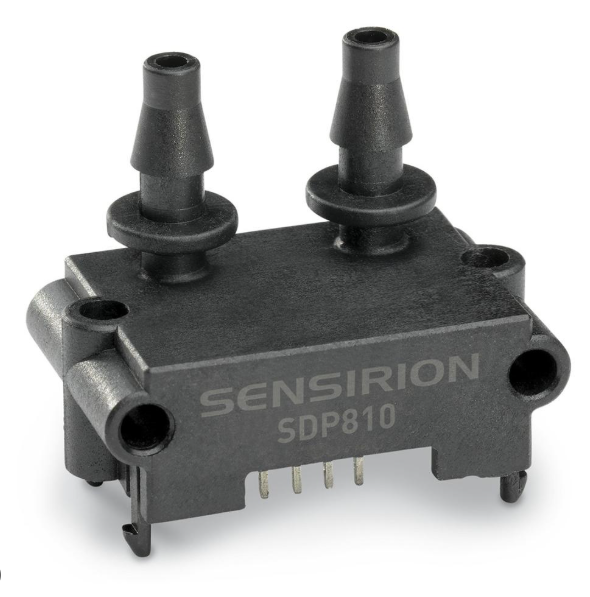
When we first open the datasheet, we can see that all SPD8XX sensors share the same datasheet so we can consider writing the driver to support every SPD8XX model which is of course nice.
Here is the link to the datasheet. I suggest you to take a quick look at it.
Different Measurement Modes
The sensor supports two different measurement modes:
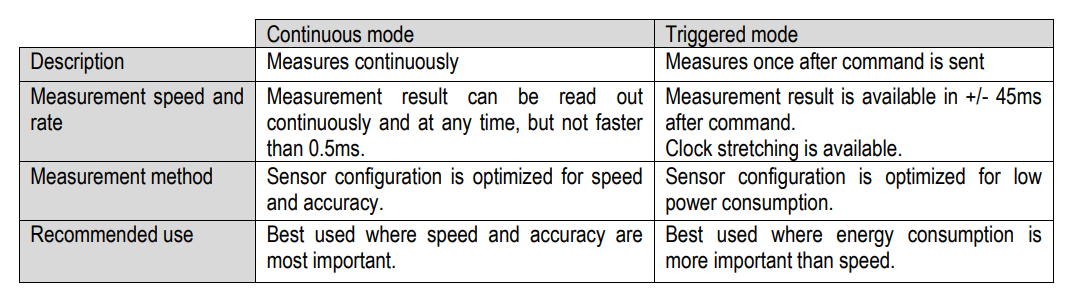
Which both support two different modes of data:
- Clock stretching YES/NO for triggered mode
- Average till read or single value for continuous mode.
And on top of that, there are two compensation modes:
Mass flow Compensated DP and Differential pressure.
Note: In this sensor the temperature data is always communicated too, regardless of the measurement mode. But if the application doesn’t need that data, we’ll just not send it.
That adds up to total of eight different measuring configurations.
However in this blog post I’ll only implement the triggered measurement modes without clock stretching as those are the ones I’ll be needing in my project.
It will be pretty trivial to implement the other modes too once everything is set up.
And on top of that there is SLEEP MODE which we have to enter explicitly between measurements.
More on this in the power management section.
I2C
We decided to support every SPD8xx model because their I2C inteface is essentially the same.
The only difference I2C-wise I could find is the I2C address itself between some models.
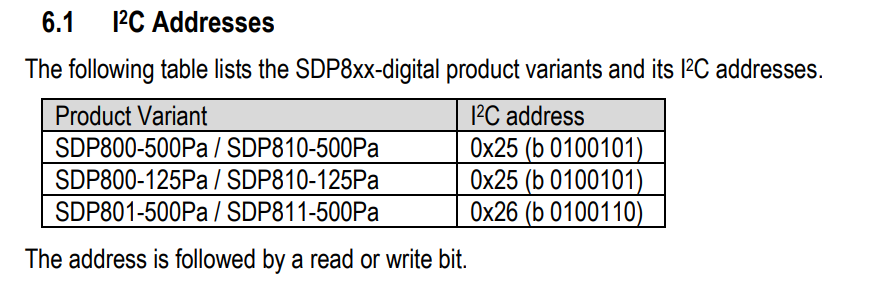
But luckily we don’t have to handle this. Generally in Zephyr I2C peripheral drivers, it’s up to the user to specify the address in the .overlay file of the board.
Source Code Structure
We start off by creating the directory structure for an out-of-tree Zephyr module. In-tree Drivers in Zephyr require a very particular structure. The same doesn’t necessary apply to external drivers, but considering that our ultimate goal would be to PR this to Zephyr, well go with it.
The final directory tree looks a bit deeper than you might expect for a single C file, but this is standard “Zephyr way” of writing external modules:
.
├── CMakeLists.txt
├── Kconfig
├── drivers
│   ├── CMakeLists.txt
│   ├── Kconfig
│   └── sensor
│       ├── CMakeLists.txt
│       ├── Kconfig
│       └── sdp8xx
│           ├── CMakeLists.txt
│           ├── Kconfig
│           ├── sdp8xx.c
│           └── sdp8xx.h
├── dts
│   └── bindings
│       └── sensor
│           └── sensirion,sdp8xx.yaml
├── include
│   └── zephyr
│       └── drivers
│           └── sensor
│               └── sdp8xx.h
└── zephyr
    └── module.yml
The Zephyr repository also has a samples directory at the root where usage can be demonstrated for each driver.
Why this structure?
It does look redundant, but this structure mirrors the upstream Zephyr repository structure exactly. Since we are following the exact same hierarchy, if I ever decide to open a Pull Request to contribute this driver to the main Zephyr codebase, it will be almost a copy-paste operation.
The “Drilling” (CMake & Kconfig)
This is a common pattern in large projects using CMake and Kconfig (such as the Linux Kernel) The build system works by recursively drilling down through these directories.
- The top-level
CMakeLists.txtadds thedriverssubdirectory. drivers/CMakeLists.txtadds thesensorsubdirectory.- Finally,
drivers/sensor/sdp8xx/CMakeLists.txtdeclares the actual library and sources.
The Driver Kconfig
In drivers/sensor/sdp8xx/Kconfig, we define the configuration symbol for our driver:
config SDP8XX
    bool "SDP8xx Differential Pressure Sensor"
    default y
    depends on DT_HAS_SENSIRION_SDP8XX_ENABLED
    select I2C
    select CRC
    help
      Enable driver for Sensirion SDP8xx Differential Pressure Sensor.
The line depends on DT_HAS_SENSIRION_SDP8XX_ENABLED is really important. It ensures that this driver option only becomes available in your configuration menu if you have actually added a sensirion,sdp8xx node to your Devicetree and enabled it.
DTS Bindings
We must make the Devicetree system aware of the different properties that are configurable for our drivers hardware-wise. This is done via a YAML binding file. This file defines the properties we can set in our .overlay board file.
Here is dts/bindings/sensor/sensirion,sdp8xx.yaml:
description: Sensirion SDP8XX Differential Pressure Sensor

compatible: "sensirion,sdp8xx"

include: [sensor-device.yaml, i2c-device.yaml]

properties:
  clock-stretching:
    type: boolean
    description: |
      If set, uses I2C clock stretching (sensor holds SCL low).
      If unset, uses polling (repeated read attempts).
  measurement-mode:
    type: string
    default: "mass-flow"
    description: "Initial measurement mode at boot"
    enum:
      - "diff-pressure"
      - "mass-flow"
This allows us to configure the sensor in our project’s .overlay file without recompiling the driver itself.
zephyr/module.yml
This file tells Zephyr’s build system that this is indeed a module. It also specifices some important locations like the module’s CMake root.
name: sdp8xx_driver

build:
  kconfig: Kconfig
  cmake: .
  settings:
    dts_root: .
The Driver Implementation
1. Structures & Init
Every Zephyr driver needs two main structures: one for configuration (immutable data from Devicetree) and one for runtime data (mutable state like current readings).
In sdp8xx.h, we define these:
struct sdp8xx_config {
    struct i2c_dt_spec i2c;
    bool clock_stretching;
    uint16_t default_mode;
};

struct sdp8xx_data {
    int16_t pressure_raw;
    int16_t temp_raw;
    uint16_t scale_factor;
    uint16_t meas_mode;
};
Every driver also must implement an init function. This get’s called automatically before the application’s mainfunction.
Pretty self-explanatory. Check that I2C is ready and wait for the power up time specified in the datasheet.
static int sdp8xx_init(const struct device *dev)
{
	const struct sdp8xx_config *cfg = dev->config;
	struct sdp8xx_data *data = dev->data;

	if (!i2c_is_ready_dt(&cfg->i2c)) {
		LOG_ERR("Device not ready");
		return -ENODEV;
	}

	/* max 25ms power up time */
	k_sleep(K_MSEC(SDP8XX_POWERUP_TIME_MS));

	data->meas_mode = cfg->default_mode;

	return 0;
}
Sensor Api
For our driver to be a proper Zephyr Sensor driver device, we need to implement three API functions that the application calls.
- One that fetches the samples. Often called
sample_fetchprefixed with driver name. In our case, this would besdp8xx_sample_fetch. And the app calls it withsensor_sample_fetch(sensor_device) - Other that communicates the sample data for a requested channel. Similarly, we will call this
sdp8xx_channel_getand the app calls it withsensor_channel_get - Third one (optional), called
sensor_attr_setfor setting custom attributes. This is not needed in every simple sensor, but we’ll implement it to enable switching between modes during runtime.
And in our driver code, we tie our implementations to the sensor api with a simple macro:
static DEVICE_API(sensor, sdp8xx_api) = {
	.sample_fetch = sdp8xx_sample_fetch,
	.channel_get = sdp8xx_channel_get,
	.attr_set = sdp8xx_attr_set
};
Now, these are not the only API’s a sensor driver can have, but these are the most important ones implemented in almost every sensor device driver.
Fetching the Sample (sample_fetch)
The core of a sensor driver is the sample_fetch function. This is where we talk to the hardware.
For the SDP8xx, we send a trigger command over I2C, wait for the measurement (max 50ms according to the datasheet), and then read the results.
Following is simplified. See full implementation here
// pseudocode
static int sdp8xx_sample_fetch(const struct device *dev, enum sensor_channel chan)
{
    struct sdp8xx_data *data = dev->data;
    const struct sdp8xx_config *cfg = dev->config;

    sdp8xx_write_command(TRIGGER_MEASUREMENT);

    k_sleep(K_MSEC(SDP8XX_TRIG_MEASURE_WAIT_MS));

    sdp8xx_i2c_read(&data);

    /* CRC CHECKS OMITTED */
    data->pressure_raw = sys_get_be16(&rx_buf[0]);
    data->temp_raw = sys_get_be16(&rx_buf[3]);
    data->scale_factor = sys_get_be16(&rx_buf[6]);
    return 0;
}
Converting the Data (channel_get)
Fetching gets us raw integers. We need to convert those to real-world units (Pascals or Celsius) when the user asks for them via channel_get on the application’s side:
sensor_channel_get(dev, SENSOR_CHAN_PRESS, &pressure);
Note: The
SENSOR_CHAN_PRESSis not our custom definition or macro, but rather a general channel for any Zephyr sensor driver that produces pressure data in Pascals.
And as the result, the following code in our driver will handle this:
static int sdp8xx_channel_get(const struct device *dev,
            enum sensor_channel chan,
            struct sensor_value *val)
{
    struct sdp8xx_data *data = dev->data;
    // ...
    switch (chan) {
    case SENSOR_CHAN_PRESS:
        /* Convert raw to Pa */
        float pressure = (float) data->pressure_raw/data->scale_factor;
        sensor_value_from_float(val, pressure);
        break;
    // ...
    }
    return 0;
}
Note: The
sensor_valuestruct contains two 32-bit unsigned integers and we have to convert our float value to this format usingsensor_value_from_floatand the application has to convert it back usingsensor_value_to_float.
Public Header & Custom Attributes (attr_set & get)
Since we want to be able to switch between “Mass Flow Compensated Differential Pressure” and “Differential Pressure” modes at runtime, we need to define custom attributes. Zephyr requires these to be defined in a public header file so the application can access them.
In include/zephyr/drivers/sensor/sdp8xx.h, we define our custom attribute:
enum sensor_attribute_sdp8xx {
    SENSOR_ATTR_SDP8XX_MEASUREMENT_MODE = SENSOR_ATTR_PRIV_START,
};

enum sdp8xx_measurement_mode {
    SDP8XX_MODE_DIFF_PRESSURE = 0,
    SDP8XX_MODE_MASS_FLOW     = 1,
};
In this file we would add the continuous measurement modes later when implemnenting them.
For setting the custom attributes, the driver implements the following function
static int sdp8xx_attr_set(const struct device *dev,
							enum sensor_channel chan,
							enum sensor_attribute attr,
							const struct sensor_value *val)
{
	struct sdp8xx_data *data = dev->data;

	if (chan != SENSOR_CHAN_ALL && chan != SENSOR_CHAN_PRESS) {
		return -ENOTSUP;
	}

	if ((enum sensor_attribute_sdp8xx)attr == SENSOR_ATTR_SDP8XX_MEASUREMENT_MODE) {
		if (val->val1 == SDP8XX_MODE_DIFF_PRESSURE ||
			val->val1 == SDP8XX_MODE_MASS_FLOW) {

			data->meas_mode = val->val1;
			return 0;
		}
		return -EINVAL;
	}
	return -ENOTSUP;
}
Which the application calls with
sensor_attr_set()
Runtime Power Management
Since this sensor is going into a battery-powered device, we want to utilize it’s sleep mode, where consumption drops to under 1 uA.
Zephyr offers a fantastic subsystem for this called Device Runtime Power Management.
When enabled, it permits drivers to do power management on their own and to automatically suspend devices when they aren’t in use and wake them up only when needed.
This is still something relatively new so I couldn’t find many sensor drivers that do it this way in the main tree, but after digging through the Device Model documentation and chatting with a veteran Zephyr maintainer, I learned the correct pattern.
The two most important functions for runtime PM are:
pm_device_runtime_get(const struct device *dev)pm_device_runtime_put(const struct device *dev)Basically, they just increament and decrement an internal usage reference counter.
And if the driver implements power management, actions will be taken when reference count drops to zero (eg. go sleep or turn off) and when it goes from zero to one (wake up / turn on).
Next, I’ll cover implementing these power management actions for my driver as well as controlling the power of another device (an I2C bus).
Also a side note here
If you have
CONFIG_PM_DEVICE_RUNTIMEenabled in your project configuration you might have to manually control the power of the dependent devices. For example, my sensor driver must explicilty request the I2C Bus to be available before sending requests and putting it down after.
Here is how I implemented it.
1. Helper Functions
First, I wrote two helpers to control the I2C bus’ power state explicitly.
These functions just tell the power management system “Hey, I need I2C bus now” and “I do not need it anymore”.
That’s basically all they do. And if the I2C controller implements PM, it will do something with this info (eg. go into low-power mode).
static int sdp8xx_i2c_get(const struct device *dev)
{
    const struct sdp8xx_config *config = dev->config;
    return pm_device_runtime_get(config->i2c.bus);
}

static int sdp8xx_i2c_put(const struct device *dev)
{
    const struct sdp8xx_config *config = dev->config;
    return pm_device_runtime_put(config->i2c.bus);
}
2. The PM Action Callback
Next, we implement the pm_action callback for our driver. This function is called automatically by Zephyr when we (inside our driver) or the application requests the device to wake up or sleep. Notice how we wrap the I2C operations with our get/put helpers.
#ifdef CONFIG_PM_DEVICE
static int sdp8xx_pm_action(const struct device *dev,
                            enum pm_device_action action)
{
    const struct sdp8xx_config *cfg = dev->config;
    int ret = 0;

    switch (action) {
    case PM_DEVICE_ACTION_RESUME:

        /* ask power management if we can have I2C bus ON now */
        ret = sdp8xx_i2c_get(dev);
        if (ret < 0) {
             LOG_WRN("Couldn't get I2C bus");
             break;
        }

        /* Send Wake-Up Pulse (Dummy Write) according to the datasheet */
        uint8_t buffer[2];
        (void)i2c_write_dt(&cfg->i2c, &buffer[0], 1);

        /* Release Bus */
        sdp8xx_i2c_put(dev);

        /* Wait for sensor to wake (Max 2ms) */
        k_sleep(K_MSEC(2));

        break;

    case PM_DEVICE_ACTION_SUSPEND:
        sdp8xx_i2c_get(dev);

        /* Send "Enter Sleep" Command */
        ret = sdp8xx_write_command(dev, SDP8XX_CMD_ENTER_SLEEP);

        sdp8xx_i2c_put(dev);
        break;

    default:
        return -ENOTSUP;
    }

    return ret;
}
#endif
3. Integrating into Sample Fetch
Finally, we update sample_fetch to wake up our sensor before measurements and to put it back to sleep after. We call pm_device_runtime_get(dev) before we start measuring, and pm_device_runtime_put(dev) when we are done.
Crucially, we also lock the bus during our measurements and release it afterwards.
Following is simplified. See full implementation here
static int sdp8xx_sample_fetch(const struct device *dev, enum sensor_channel chan)
{
    /* ... variable declarations ... */

    /* 1. Lock I2C Bus (Dependency) */
    sdp8xx_i2c_get(dev);

    /* 2. Wake up Sensor (Calls RESUME callback) */
    if (pm_device_runtime_get(dev) < 0) {
        goto exit_bus;
    }

    /* 3. Trigger Measurement */
    if (sdp8xx_write_command(dev, cmd) < 0) {
        goto exit_dev;
    }

    /* 4. Wait for measurement (keep I2C on because we are about to read) */
    k_sleep(K_MSEC(SDP8XX_TRIG_MEASURE_WAIT_MS));

    /* 5. Read Data */
    i2c_read_dt(&cfg->i2c, rx_buf, sizeof(rx_buf));

exit_dev:
    /* 6. Suspend Sensor (Calls SUSPEND callback) */
    pm_device_runtime_put(dev);

exit_bus:
    /* 7. Release I2C Bus */
    sdp8xx_i2c_put(dev);

    return 0;
}
4. Booting directly to sleep
Now since the sensor boots to IDLE mode by default, we should enter sleep mode from our init.
This is achieved by adding pm_device_runtime_enable(dev); to the end of our initialisation sequence.
Because the reference count to our device is zero on init, this function will implicitly call the PM_ACTION_SUSPEND callback.
static int sdp8xx_init(const struct device *dev)
{
	const struct sdp8xx_config *cfg = dev->config;
	struct sdp8xx_data *data = dev->data;

	if (!i2c_is_ready_dt(&cfg->i2c)) {
		LOG_ERR("Device not ready");
		return -ENODEV;
	}

	/* max 25ms power up time */
	k_sleep(K_MSEC(SDP8XX_POWERUP_TIME_MS));

	data->meas_mode = cfg->default_mode;

	return pm_device_runtime_enable(dev);
}
5. Device Definition
To wire this all up, we need to register the PM callback in our device definition macro using PM_DEVICE_DT_INST_DEFINE.
#define SDP8XX_INIT(inst)                               \
    /* ... data and config structs ... */               \
                                                        \
    /* Register the PM Action Callback */               \
    PM_DEVICE_DT_INST_DEFINE(inst, sdp8xx_pm_action);   \
                                                        \
    SENSOR_DEVICE_DT_INST_DEFINE(inst,                  \
        sdp8xx_init,                                    \
        PM_DEVICE_DT_INST_GET(inst), /* Pass PM ref */  \
        &sdp8xx_data_##inst,                            \
        &sdp8xx_config_##inst,                          \
        POST_KERNEL,                                    \
        CONFIG_SENSOR_INIT_PRIORITY,                    \
        &sdp8xx_api);
The Result
With this implementation, the sensor:
- Boots up and immediately enters Sleep Mode (0.27 µA measured).
- When
sensor_sample_fetchis called, it wakes up, measures, and goes back to sleep. - If the app wants to prevent delay from waking up, it can just wrap the sample calls between
getandputto hold the reference count.
And IMO the neatest part about all of this, we can just toggle off CONFIG_PM_DEVICE_RUNTIME=n and everything works as if there was no runtime power management. All of the calls to the relevant APIs are just ignored on compile time.
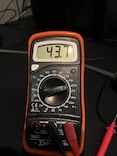
I also measured current for the sensor in IDLE mode compared to SLEEP mode.
In SLEEP, we have stable 0.27 microamps.
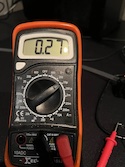
In IDLE (default mode on boot), we have around 50 microamps
Usage
Now that the driver is ready, we can create a sample application to demonstrate usage.
1. Include the Module
In the application’s CMakeLists.txt, the following line tells Zephyr to look for external moudles in this directory:
list(APPEND EXTRA_ZEPHYR_MODULES ${CMAKE_CURRENT_SOURCE_DIR}/path/to/sdp8xx_driver)
2. Configure the Hardware
In your board’s .overlay file, enable the I2C bus and add the sensor node. This is where we set the properties defined in our YAML file.
And to enable runtime power management for both the sensor and I2C bus, we add zephyr,pm-device-runtime-auto; to both.
&i2c0 {
	compatible = "nordic,nrf-twi";
	status = "okay";
	pinctrl-0 = <&i2c0_default>;
	pinctrl-1 = <&i2c0_sleep>;
	pinctrl-names = "default", "sleep";
	zephyr,pm-device-runtime-auto;
	sdp8xx@25 {
		status = "okay";
		compatible = "sensirion,sdp8xx";
		reg = <0x25>;
		/* clock-stretching; */
		/* measurement-mode = "diff-pressure"; */
		zephyr,pm-device-runtime-auto;
	};
};

&pinctrl {
    i2c0_default: i2c0_default {
        group1 {
            psels = <NRF_PSEL(TWIM_SDA, 0, 26)>,
                    <NRF_PSEL(TWIM_SCL, 0, 27)>;
            bias-pull-up;
        };
    };

    i2c0_sleep: i2c0_sleep {
        group1 {
            psels = <NRF_PSEL(TWIM_SDA, 0, 26)>,
                    <NRF_PSEL(TWIM_SCL, 0, 27)>;
            low-power-enable;
            bias-pull-up;
        };
    };
};
3. Application Code
In main.c, we can now use the standard Zephyr Sensor API to interact with the device.
Get the device:
#include <zephyr/drivers/sensor.h>
#include <zephyr/drivers/sensor/sdp8xx.h>

const struct device *dev = DEVICE_DT_GET_ANY(sensirion_sdp8xx);

int main(void)
{
    if (!device_is_ready(dev)) {
        LOG_ERR("Sensor not ready");
        return;
    }

    /* ... */
}
Change Attributes (Optional): If you want to switch modes at runtime, use the custom attribute we created:
struct sensor_value attr = {
    .val1 = SDP8XX_MODE_DIFF_PRESSURE
};
sensor_attr_set(dev, SENSOR_CHAN_PRESS, SENSOR_ATTR_SDP8XX_MEASUREMENT_MODE, &attr);
Read Data: The standard fetch-and-get loop:
struct sensor_value pressure, temp;

while (1) {
    // Tell the driver to sample
    if (sensor_sample_fetch(dev) < 0) {
        LOG_ERR("Fetch failed");
        continue;
    }

    // Read processed values
    sensor_channel_get(dev, SENSOR_CHAN_PRESS, &pressure);
    sensor_channel_get(dev, SENSOR_CHAN_AMBIENT_TEMP, &temp);

    // Print
    LOG_INF("Pressure: %.2f Pa", sensor_value_to_float(&pressure));
    LOG_INF("Temp: %.2f C", sensor_value_to_float(&temp));

    k_sleep(K_MSEC(100));
}
Field Testing
In my next blog post you’ll see the sensor and the driver in action. I’ll be making a prototype BLE differential pressure meter peripheral using NRF52DK.